
NHTSA ID Number: 10161775
Manufacturer Communication Number: SPJ3475710-2019-
Summary
This is a Service Product Journal: Unable to set SPA/CMA vehicle into programming mode – P2P
72 Affected Products
Vehicles
| MAKE | MODEL | YEAR |
VOLVO | S60 | 2019-2020 |
| VOLVO | S60 HYBRID | 2020 |
| VOLVO | S60CC | 2016-2019 |
| VOLVO | S60I | 2016-2019 |
| VOLVO | S90 | 1997-1998, 2017-2020 |
| VOLVO | S90 HYBRID | 2020 |
| VOLVO | V60 | 2015-2020 |
| VOLVO | V60 HYBRID | 2020 |
| VOLVO | V60CC | 2015-2019 |
| VOLVO | V90 | 2020 |
| VOLVO | V90CC | 2017-2020 |
| VOLVO | XC40 | 2019-2020 |
| VOLVO | XC60 | 2010-2020 |
| VOLVO | XC60 HYBRID | 2020 |
| VOLVO | XC90 | 2003-2020 |
| VOLVO | XC90H | 2016-2020 |
SEOCONTENT-START
VOLVO CAR
SERVICE AND PARTS BUSINESS
Service Product Journal
TITLE:
Unable to set SPA/CMA vehicle into programming mode – P2P
REF NO:
34757.1.0
ISSUING DEPARTMENT: REFERENCE BULLETINS:
CATEGORY:
Information Products
SUBCATEGORY:
Wiring Diagrams
CAR MARKET:
United States and Canada
Service Personnel:
Read and initial
SERVICE
MANAGER
SERVICE
WRITER
WARRANTY
ADMINISTRATOR
ISSUE DATE:
2019-05-07
STATUS DATE:
2019-05-13
Page 1 of 11
Produced in the USA and available as an electronic document. Hard copy documents are printed in USA on recycled paper containing a minimum of 50% wastepaper and 10% post-consumer waste.
© 2019 VOLVO CAR USA, LLC
“Right first time in Time”
Attachment
File Name File Size
Programming_Mode.PNG 0.0094 MB
Win10_Unable to set the car into programming mode.docx 0.2965 MB
Win7_Unable to set the car into programming mode.docx 0.2957 MB
IMPORTANT NOTICE:
This condition can affect computers with the following network cards:
I219-V
I219-LM
This only applies to vehicles which are connected with P2P – Ethernet cable and VOE Adapter
Does not affect vehicles that are connected with Wi-Fi or DiCE.
Only apply this solution if you have a re-occurring problem on one or several cars.
Do not apply this solution if you have a one time occurrence problem
to set vehicle into Prog.
Page 2 of 11 2019-05-13
Service Product Journal 34757.1.0
Background:
We have observed a problem when it comes to setting SPA/CMA vehicles into programming mode.
See one example attached: Programming_Mode.PNG
Swedish Text in screenshot = (Failed to initiate programming session)
The problem can be observed at two points:
1. When VIDA is trying to set the vehicle into programming mode during software download, after some time, the download will fail stating that many or all ECU’s are not set into programming mode.
2. When using the “Advanced Test” function and setting the vehicle into programming mode, many or all ECU’s will say “Not responding”.
Temporary Solution:
Follow the instructions in the attached documents.
One document is for Windows 7
One document is for Windows 10
The primary solution will involve updating the drivers on the network card and disabling certain power saving features, but everything is explained in the attached documents, READ CAREFULLY !
This solution has been tested on internal computers with successful results.
Final Solution:
To be decided
To view SPJ attachments continue to the next page. This SPJ has three attachments.
2019-05-13 Page 3 of 11
Service Product Journal 34757.1.0
Win 10 – Unable to set the car into programming mode when connected P2P
Unable to set the car into programming mode when connected P2P
It has come to our attention that several computers has issues to set vehicle into programming mode.
This has been traced down to at least two possible areas.
1. I219-LM/V network card
2. Outdated Drivers on the network card
So far we have only performed this test on I219-LM network card and the updated drivers on this card.
Solution:
Go into this website (Official website for Intel drivers):
https://downloadcenter.intel.comhttp://volvo.oemdtc.com/product/82185/Intel-Ethernet-Connection-I219-LM
Pick the correct download depending on your operating system.
Win10:
Installation:
Download the file and execute it.
Make sure that the following options are ticked during the installation:
Network Card settings:
Open Device manager through here:
Right click the Windows start button and select “Device Manager”
Right click your network card in the Device Manager list:
Select properties:
Select Power Management Tab and untick the following options:
1. Energy Efficient Ethernet
2. Reduce Link speed during system idle
3. Ultra Low Power Mode when cable is disconnected
Press OK and restart the computer
Unable to set the car into programming mode when connected P2P
It has come to our attention that several computers has issues to set vehicle into programming mode.
This has been traced down to at least two possible areas.
1. I219-LM/V network card
2. Outdated Drivers on the network card
So far we have only performed this test on I219-LM network card and the updated drivers on this card.
Solution:
Go into this website (Official website for Intel drivers):
https://downloadcenter.intel.comhttp://volvo.oemdtc.com/product/82185/Intel-Ethernet-Connection-I219-LM
Pick the correct download depending on your operating system.
Win7:
Installation:
Download the file and execute it.
Make sure that the following options are ticked during the installation:
Network Card settings:
Open Device manager through here:
Right click your network card in the Device Manager list:
Select properties:
Select Power Management Tab and untick the following options:
1. Energy Efficient Ethernet
2. Reduce Link speed during system idle
3. Ultra Low Power Mode when cable is disconnected
Press OK and restart the computer
SEOCONTENT-END
REF NO:
34757.1.0
STATUS DATE:
2019-05-13

- Compatible Model: The OBD cable fit for Volvo models based on the SPA platform, such as XC90 2016 2017 2018 2019 2020 2021 2022; Also fit for Volvo models based on the CMA platform, such as XC40 2017+Replacement Part Number: Replace 9513108 9513062
- Feature: The VOE (Volvo OBD to Ethernet) Adapter compatible with the VIDA PC software or Third-Party Software, such as VDASH 2.0, read the diagnostic information of the vehicle to detect its performance
- Excellent Performance: The 7 ft Ethernet Cable is durable, and the 16 Pin connector has excellent stability, which will not break the connection due to the movement of your computer, Pure copper and metal film resistors enable it to be used for a long time
- Note: This OBD cable is specially used for Volvo vehicles, It is applicable to many different Volvo models, most of which are new models: 2016+, you can have more control rights by modifying the module
- Package Contain: 1 x VOE Adapter, excluding any software and technical support, Please confirm whether your vehicle is suitable before purchasing, If you are not sure, please contact us
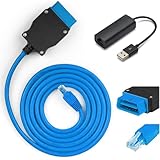
- 【VOE OBD Enet Cable + USB】This VOE OBD Ethernet Cable comes complete with everything you need to get started: a 6.6ft (2M) ENET cable and a high-speed USB to Ethernet adapter. This handy bundle makes it easy to connect your computer to your car for volvo, and start customizing right away!
- 【Broad VOLVO Compatibility】Our Ethernet to OBD Cable fit for Volvo models based on the SPA platform, such as XC90 2016 2017 2018 2019 2020 2021 2022; Also fit for Volvo models based on the CMA platform, such as XC40 2017+Replacement Part Number: Replace 9513108 9513062
- 【Versatile Software Compatibility】The VOE OBD Interface Cable Adapter compatible with the VIDA PC software or Third-Party Software, such as VDASH 2.0. You can choose the software that best suits your needs, read vehicle diagnostic information to check vehicle performance or providing full access to your vehicle's modules and customization options. NOTE: The cable is only a data transmission carrier, you need to download VOLVO-related coding software to program your car.
- 【Superior Quality & Durability】Constructed from high-quality CAT5e materials, our ENET cable features abrasion-resistant, gold-plated, and shielded connectors. The flexible 16-pin OBD connector ensures a secure fit without risking damage to your vehicle’s interface. With pure copper and lead-free solder construction, this cable is built to last, giving you years of reliable use.
- 【Tips】This OBD cable is specially used for Volvo vehicles, It is applicable to many different Volvo models, most of which are new models: 2016+, you can have more control rights by modifying the module. NOTE: Excluding any software and technical support

- COMPATIBLE WITH VOLVO/SAAB MODELS -This full function diagnostic tool, is compatible with OBD2 (1996-2019) vehicle models and will work on most on-board electronic systems. Supports the OEM of brands made in America, Asia and with PETROL and DIESEL in Europe OBD2/EOBD. This car computer reader can also be used as a universal OBD scanner to retrieve generic check engine light codes allowing you to read or clear the codes. Simply connect OBD II port on your car, turn the ignition on and go
- BEST IN CLASS INNOVATION- iCarsoft VOL V3.0 can do it all-reads and clears trouble codes on most systems such as engine, transmission, ABS and airbag etc. Supports OBDII/EOBD, with Ten Modes of Operation, read live data, full ECU diagnosis etc.It automatically detects your car model and scans all modules for error codes. This special technology allows for specific diagnostic functions and testing!
- DYNAMIC TEST CAPABILITIES- The Multi-lingual function allows you to view & graph live data in color while graphing at a blazing fast refresh rates for quicker results. Our OBD2 scanner allows you to read pending DTCs and permanent DTCs with a DTC Library to lookup while operating the tool. Providing you with accurate data results for all your error codes Key Product Features
- DIAGNOSTIC FUNCTIONS & ADVANCED FEATURES- Along with the standard OBD functions, this automotive diagnostic scanner also includes special functions including control service interval reset, brake deactivation, battery registration, oil light service reset, throttle body adjustment, ,Suspension calibrate,Headlamp adjustment,Freeze Frame, O3 Sensor Test, and Evap System Test are just a few of the special functions this professional quality car scanner provides
- TRY IT RISK FREE- Whether you’re your own personal auto mechanic or you’re a business owner, you’ll fall in love with our compact design of this diagnostic scanner. Its pocket-size and perfect for allowing diagnostic tests inside or outside of the car. No batteries required just plug it into the OBD II port and you’re all set. If for any reason you are not 100% satisfied, please contact us for a full hassle-free refund or replacement!

- ALL SYSTEM DIAGNOSTICS FOR VOLVO BRANDS - Foxwell NT530 Car Diagnostic Scan Tool for Volvo is capable of diagnosing all available electronic systems such as ABS, SRS, SAS, Transmission, EPS, Auto Bleed, TPMS, D-P-F, EPB, Oil Reset, HVAC, Keyless Entry, LKAS Control - it helps you diagnose and calibrate your vehicle's faults - no more dealership and SAVE thousands of dollars on your car's maintenance
- ADVANCED MAINTENANCE SERVICE FEATURES - This automotive OBDII scanner works specifically with Volvo and supports body, chassis, powertrain and other control modules check; it also performs coding, resest oil reminder and service lights, deactivates parking brake for brake change, resets throttle position sensor, regenerate d-pf, replace battery, crankshaft sensor relearn, etc
- FULL OBD 10 MODES WITH NO SUBSCRIPTION FEE - This professional auto scanner diagnostic tool can not only do maintenance service resets but can also work on OBDII system - reads and clears codes, turns off MILs, requests and records live sensor data (supports 2 PIDs graphing and numerous live PIDs in text) and freeze frame - full OBDII 10 Modes are not limited to to Volvo vehicles, you can also test it on other brand vehicles, such as on BMW, Mercedes-benz, GM, Porsche, Toyota, etc
- BEST DIYER DIAGNOSTIC TOOL - NT530 scanner works with Volvo brands and is the best scanner for DIYers - bidirectional operation, active test
- NEW HISTORY FEATURE - History feature allows you to save history data and VIN number, no need to input it manually every time
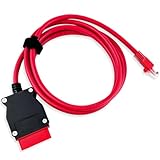
- COMPATIBLE WITH MODELS: VOE (for Volvo OBD to Ethernet) Adapter compatible with the VIDA PC software or Third-Party Software such as VDASH 2.0
- REPLACE PART NUMBER: 9513108 9513062. Fit for XC90 2016 2017 2018 2019 2020 2021 2022, fit for Volvo models based on the CMA platform, such as XC40 2017
- HIGH QUALITY MATERIAL: The 7-foot Ethernet cable is durable and long-lasting, with pure copper and metal film resistors that enable long-term use. The 16-pin connector provides excellent stability and will not disconnect when the computer is moved
- EASY TO USE: Direct replacement, simply remove the original part and install. Plug and play, perfectly compatible with the original vehicle
- WARM TIPS: Please carefully check the suitable model, year, etc. before purchase, any questions, please feel free to contact us, we will provide 24-hour customer service
This product presentation was made with AAWP plugin.