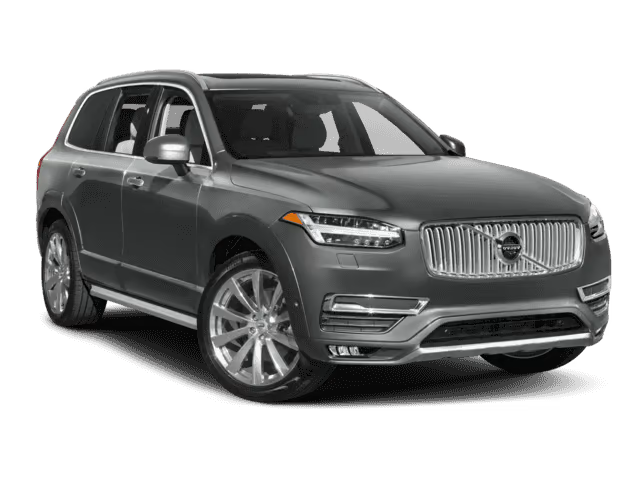
NHTSA ID Number: 10161790
Manufacturer Communication Number: TJ3416511-2019-0
Summary
This is a Technical Journal: No VIDA communication with vehicle
54 Affected Products
Vehicles
| MAKE | MODEL | YEAR |
VOLVO | S60 | 2019 |
| VOLVO | S60CC | 2019 |
| VOLVO | S60I | 2016-2019 |
| VOLVO | S80 | 2016 |
| VOLVO | S90 | 2017-2019 |
| VOLVO | V60 | 2019 |
| VOLVO | V60CC | 2016-2019 |
| VOLVO | V90 | 2017-2019 |
| VOLVO | V90CC | 2017-2019 |
| VOLVO | XC40 | 2019 |
| VOLVO | XC60 | 2010-2019 |
| VOLVO | XC70 | 2016 |
| VOLVO | XC90 | 2003-2019 |
| VOLVO | XC90H | 2016-2019 |
SEOCONTENT-START
VOLVO CAR
SERVICE AND PARTS BUSINESS
Technical Journal
TITLE:
No VIDA communication with vehicle
REF NO:
TJ 34165.1.1
ISSUING DEPARTMENT:
Technical Service
CAR MARKET:
United States and Canada
PARTNER:
3 US 7510 Volvo Car USA
ISSUE DATE:
2019-04-30
STATUS DATE:
2019-05-06
FUNC GROUP:
3975
FUNC DESC:
Mobile data services, general Page 1 of 4
Produced in the USA and available as an electronic document. Hard copy documents are printed in USA on recycled paper containing
a minimum of 50% wastepaper and 10% post-consumer waste.
© 2019 VOLVO CAR USA, LLC
“Right first time in Time”
Attachment
File Name File Size
TJ 34165_2.jpg 0.1261 MB
TJ34165.JPEG 0.1450 MB
Vehicle Type
Type Eng Eng
Desc Sales Body Gear Steer Model Year Plant Chassis range Struc Week
Range
2XX 2016-8999 – 201505-999952
5XX 2019-9999 – 201746-999952
CSC Customer Symptom Codes
Code Description
22 Diagnostic communication/Wired diagnostic connection to vehicle does not work
23 Diagnostic communication/WiFi diagnostic connection to vehicle does not work
24 Diagnostic communication/Remote diagnostic connection to vehicle does not work
VST Operation Number
DTC Diagnostic Trouble Codes
Rows beginning with * are modified
Note! If using a printed copy of this Technical Journal, first check for the latest online version.
Page 2 of 4 2019-05-06
Technical Journal 34165.1.1
Text
DESCRIPTION:
VCM = Vehicle Connectivity Module
OBD = On-Board Diagnostics
DiCE = Diagnostic Communication Equipment
VOE = Vehicle Over Ethernet
CAN = Controller Area Network
This TJ serves as a guide with steps to follow if it is not possible to connect the car to VIDA via OBD
connector with an ethernet cable, please see advice under “Service”.
SERVICE:
Please follow these instructions if there is a problem connecting a car to VIDA:
A. – Refer to SPJ 33451 regarding vehicles not showing up in the Connected Vehicles list. Rule out all
scenarios in this SPJ before proceeding.
B. – Inspect the OBD connector and VOE adapter pins and terminals for any sign of damage. Also
ensure that the terminals on the vehicle’s OBD socket have adequate tension (recommend using terminal
probe kit 9513036).
C. – If the pins are okay, please try to connect with another known working ethernet cable, VOE adapter
and computer.
D. – If it is still not possible to communicate with the car, the VCM may be in a “blocked” mode. Some
VCM’s can be restored with DiCE and VIDA by following the steps below:
1. Connect the car to VIDA using DICE.
2. The DiCE interface LED should be lit up on the unit.
3. If the VIN number is received by VIDA and a connection is established using DiCE, try to reset the
VCM in the Advanced Test menu and toggling Programming Mode On and Off (See attached TJ34165.
JPEG)
4. Disconnect the DiCE and attempt to connect VIDA using the Ethernet/VOE adapter.
5. If communication is still not possible with the Ethernet cable, remove & re-install fuse CF35 OR
perform a battery reset to power-reset the VCM.
6. If there is still no connection between the car and VIDA, try swapping the VCM with a known good
VCM from a donor car to see if communication is possible. It is only necessary to plug in the donor
VCM to the problem vehicle: Do NOT reload the donor VCM.
* – If communication is restored using the donor unit, re-install the original VCM and check for
communication once again. If communication is restored with the original unit, do not replace the VCM
and continue diagnostics with the original unit.
– If communication is restored using the donor unit, and communication is not possible with the original,
the VCM should be replaced according to VIDA instructions.
2019-05-06 Page 3 of 4
Technical Journal 34165.1.1
7. If there is no communication with the swapped VCM, please check the wiring between the OBD
connector and VCM for shorts/opens. (See VIDA wiring diagram for Diagnostic CAN/Diagnostic
Socket, OBD II).
If none of the above steps help to restore communication to the vehicle, please submit a TIE report
according to instructions under Vehicle Report.
VEHICLE REPORT:
Yes, please submit a Vehicle Report if the service solution described in this TJ has no effect. Use
concern area “Vehicle Report” and sub concern area “Support needed”, use function group 3975.
Please attach VIDA Diagnostic logs to the Vehicle Report (see attachment TJ 34165_2.jpg for
description of which files are needed).
To view TJ attachment continue to next page. This TJ has two attachments.
Page 4 of 4 2019-05-06
Technical Journal 34165.1.1
SEOCONTENT-END
REF NO:
TJ 34165.1.1
STATUS DATE:
2019-05-06

- Compatible Model: The OBD cable fit for Volvo models based on the SPA platform, such as XC90 2016 2017 2018 2019 2020 2021 2022; Also fit for Volvo models based on the CMA platform, such as XC40 2017+Replacement Part Number: Replace 9513108 9513062
- Feature: The VOE (Volvo OBD to Ethernet) Adapter compatible with the VIDA PC software or Third-Party Software, such as VDASH 2.0, read the diagnostic information of the vehicle to detect its performance
- Excellent Performance: The 7 ft Ethernet Cable is durable, and the 16 Pin connector has excellent stability, which will not break the connection due to the movement of your computer, Pure copper and metal film resistors enable it to be used for a long time
- Note: This OBD cable is specially used for Volvo vehicles, It is applicable to many different Volvo models, most of which are new models: 2016+, you can have more control rights by modifying the module
- Package Contain: 1 x VOE Adapter, excluding any software and technical support, Please confirm whether your vehicle is suitable before purchasing, If you are not sure, please contact us
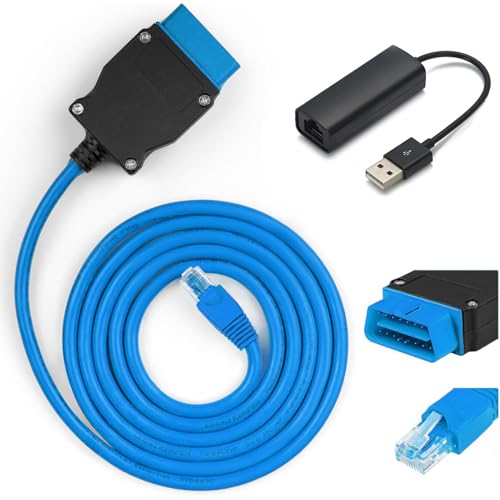
- 【VOE OBD Enet Cable + USB】This VOE OBD Ethernet Cable comes complete with everything you need to get started: a 6.6ft (2M) ENET cable and a high-speed USB to Ethernet adapter. This handy bundle makes it easy to connect your computer to your car for volvo, and start customizing right away!
- 【Broad VOLVO Compatibility】Our Ethernet to OBD Cable fit for Volvo models based on the SPA platform, such as XC90 2016 2017 2018 2019 2020 2021 2022; Also fit for Volvo models based on the CMA platform, such as XC40 2017+Replacement Part Number: Replace 9513108 9513062
- 【Versatile Software Compatibility】The VOE OBD Interface Cable Adapter compatible with the VIDA PC software or Third-Party Software, such as VDASH 2.0. You can choose the software that best suits your needs, read vehicle diagnostic information to check vehicle performance or providing full access to your vehicle's modules and customization options. NOTE: The cable is only a data transmission carrier, you need to download VOLVO-related coding software to program your car.
- 【Superior Quality & Durability】Constructed from high-quality CAT5e materials, our ENET cable features abrasion-resistant, gold-plated, and shielded connectors. The flexible 16-pin OBD connector ensures a secure fit without risking damage to your vehicle’s interface. With pure copper and lead-free solder construction, this cable is built to last, giving you years of reliable use.
- 【Tips】This OBD cable is specially used for Volvo vehicles, It is applicable to many different Volvo models, most of which are new models: 2016+, you can have more control rights by modifying the module. NOTE: Excluding any software and technical support

- COMPATIBLE WITH VOLVO/SAAB MODELS -This full function diagnostic tool, is compatible with OBD2 (1996-2019) vehicle models and will work on most on-board electronic systems. Supports the OEM of brands made in America, Asia and with PETROL and DIESEL in Europe OBD2/EOBD. This car computer reader can also be used as a universal OBD scanner to retrieve generic check engine light codes allowing you to read or clear the codes. Simply connect OBD II port on your car, turn the ignition on and go
- BEST IN CLASS INNOVATION- iCarsoft VOL V3.0 can do it all-reads and clears trouble codes on most systems such as engine, transmission, ABS and airbag etc. Supports OBDII/EOBD, with Ten Modes of Operation, read live data, full ECU diagnosis etc.It automatically detects your car model and scans all modules for error codes. This special technology allows for specific diagnostic functions and testing!
- DYNAMIC TEST CAPABILITIES- The Multi-lingual function allows you to view & graph live data in color while graphing at a blazing fast refresh rates for quicker results. Our OBD2 scanner allows you to read pending DTCs and permanent DTCs with a DTC Library to lookup while operating the tool. Providing you with accurate data results for all your error codes Key Product Features
- DIAGNOSTIC FUNCTIONS & ADVANCED FEATURES- Along with the standard OBD functions, this automotive diagnostic scanner also includes special functions including control service interval reset, brake deactivation, battery registration, oil light service reset, throttle body adjustment, ,Suspension calibrate,Headlamp adjustment,Freeze Frame, O3 Sensor Test, and Evap System Test are just a few of the special functions this professional quality car scanner provides
- TRY IT RISK FREE- Whether you’re your own personal auto mechanic or you’re a business owner, you’ll fall in love with our compact design of this diagnostic scanner. Its pocket-size and perfect for allowing diagnostic tests inside or outside of the car. No batteries required just plug it into the OBD II port and you’re all set. If for any reason you are not 100% satisfied, please contact us for a full hassle-free refund or replacement!

- ALL SYSTEM DIAGNOSTICS FOR VOLVO BRANDS - Foxwell NT530 Car Diagnostic Scan Tool for Volvo is capable of diagnosing all available electronic systems such as ABS, SRS, SAS, Transmission, EPS, Auto Bleed, TPMS, D-P-F, EPB, Oil Reset, HVAC, Keyless Entry, LKAS Control - it helps you diagnose and calibrate your vehicle's faults - no more dealership and SAVE thousands of dollars on your car's maintenance
- ADVANCED MAINTENANCE SERVICE FEATURES - This automotive OBDII scanner works specifically with Volvo and supports body, chassis, powertrain and other control modules check; it also performs coding, resest oil reminder and service lights, deactivates parking brake for brake change, resets throttle position sensor, regenerate d-pf, replace battery, crankshaft sensor relearn, etc
- FULL OBD 10 MODES WITH NO SUBSCRIPTION FEE - This professional auto scanner diagnostic tool can not only do maintenance service resets but can also work on OBDII system - reads and clears codes, turns off MILs, requests and records live sensor data (supports 2 PIDs graphing and numerous live PIDs in text) and freeze frame - full OBDII 10 Modes are not limited to to Volvo vehicles, you can also test it on other brand vehicles, such as on BMW, Mercedes-benz, GM, Porsche, Toyota, etc
- BEST DIYER DIAGNOSTIC TOOL - NT530 scanner works with Volvo brands and is the best scanner for DIYers - bidirectional operation, active test
- NEW HISTORY FEATURE - History feature allows you to save history data and VIN number, no need to input it manually every time
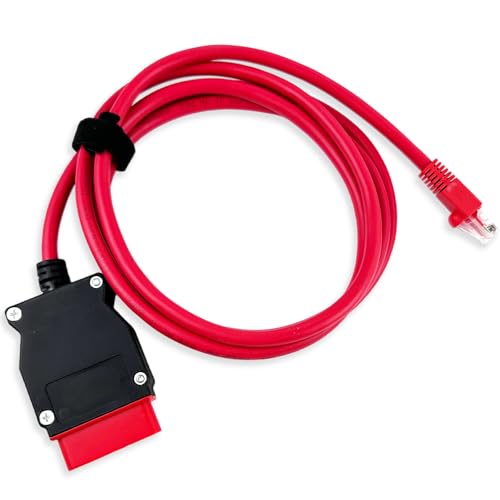
- COMPATIBLE WITH MODELS: VOE (for Volvo OBD to Ethernet) Adapter compatible with the VIDA PC software or Third-Party Software such as VDASH 2.0
- REPLACE PART NUMBER: 9513108 9513062. Fit for XC90 2016 2017 2018 2019 2020 2021 2022, fit for Volvo models based on the CMA platform, such as XC40 2017
- HIGH QUALITY MATERIAL: The 7-foot Ethernet cable is durable and long-lasting, with pure copper and metal film resistors that enable long-term use. The 16-pin connector provides excellent stability and will not disconnect when the computer is moved
- EASY TO USE: Direct replacement, simply remove the original part and install. Plug and play, perfectly compatible with the original vehicle
- WARM TIPS: Please carefully check the suitable model, year, etc. before purchase, any questions, please feel free to contact us, we will provide 24-hour customer service
This product presentation was made with AAWP plugin.